|
|
|
Software Design - Designing For Change
"That which does not change, is dead" - Lao Tzu
"Software never stops changing until it's thrown away." - Anon.
A design that doesn’t take change into account is likely to break when modified. New features and bug fixes will continue throughout the life of the product. Hopefully, they will not require major redesign of the code. From one excellent source comes these major causes of re-design (Gamma et. al Design Patterns, Elements of Object-Oriented Software):
-
Instantiating an object class will explicitly commit the design to a specific implementation.
-
Dependence on a specific operation will hard-code how requests for that operation are handled.
-
Dependence on hardware and software platform will make it impossible to port software.
-
Dependence on object representation or implementation will require users of those objects to change when the object changes.
-
Algorithm dependencies will require objects to change when an algorithm changes.
-
Tight coupling will lead to objects that are difficult to reuse, and a system that is dense and difficult to debug or change.
-
Extending functionality by sub-classing can break subclasses if the base class changes. It also constrains program behavior to those sub-classes that existed at compile time.
-
Inability to alter classes conveniently, such as with third-party libraries, can prohibit change or re-use.
Examine your project and decide which of the above causes will be most prevalent. If a cause applies to your project, then look for a design method that mitigates that cause.
-
Encapsulate the concept that varies.
-
Define object behavior at runtime rather than design time (e.g. class factories).
-
Delegate object behavior where change is likely to occur.
-
Define only the interface to an object.
-
Program to the interface, not the implementation.
-
What the language or compiler does not provide, implement with coding standards.
-
Create unit test shells for modules; written to exercise the module's interface.
- Don’t re-invent the wheel – use proven design patterns.
|
True Horror Story
A senior programmer wrote an object (using C++) that read a file and held the data internally. When other objects needed the data, since the programmer knew how it was stored internally, and this same programmer was also writing the other objects, the programmer chose to simply return a pointer to the array of data. Objects using the data were then coded based on the knowledge of the internal representation of the data inside the file object.
Later, when a maintenance programmer tried to add a new feature, the internal representation of the file object had to change. The entire program broke! In fact, because there were so many objects depending on that specific representation, the feature had to be dropped - the code simply could not accommodate the change. |
Degrees of Freedom in the Design
In this context, degrees of freedom means those assumptions that must be allowed to change without requiring re-compilation of the program. The more degrees of freedom, the more the program become configurable. The degrees of freedom reflect not only the existing requirements, but also the reasonable possibility of new requirements, even if there is no request for such a requirement at this time. By explicitly listing the degrees of freedom during design, the developers can write more robust code.
When enumerating the Degrees of Freedom, I also find it useful to enumerate those facets that are not expected to change.
System Policies
From the RM-ODP design methodology (an extremely formal process) I have found one concept to be universally useful: System Policies. These describe the system's obligations, permissions, and prohibitions.
- Obligation - The system must provide this functionality, otherwise the system is not acceptable.
- Permissions - The system can allow this condition to exist.
- Prohibitions - Things that the system must not allow, otherwise the system is unacceptable.
For example, when designing an application to allow a laboratory technician to enter information about samples being processed, these were some of the system policies that were identified:
Obligations |
Allow up to 20 Racks in the worklist (each rack holds up to 10 samples). |
|
Maintain a local backup copy of all worklists in the event that the original save folder becomes unavailable. For example, if worklist was originally saved to a network folder and the network becomes unavailable, the backup worklist can be used. |
|
All Racks except the last must have exactly ten samples (i.e. no gaps in the middle of the worklist). |
|
Allow worklist to be saved under a different name or directory. |
|
Allow Racks and Samples to be added and deleted at any point in the worklist. |
Permissions |
Last Rack may have less than ten Samples. |
|
Local backup worklists can be automatically deleted after 30 days. |
|
By default, the worklist name will be a unique date/time stamp to ensure that it is unique. However, the user will have the option to save the worklist under a different name. |
|
Duplicate Sample barcodes are allowed. |
|
No restrictions on user access to the program. |
Prohibitions |
No duplicate Rack barcodes allowed within the same worklist. |
|
No two worklists within the same directory may have the same name. |
Data-Driven Design vs. Logic Driven Design
If data is most subject to change:
- Define data representation.
- Write code to operate on the data representation.
- Same logic operates repetitively on changing data.
Example: in an embedded application, I had to do contrast enhancement on an image. The image was an 8-bit grayscale image, so rather than implement mathematical logic, I used a 256-byte lookup table. The original pixel was used to address the table, and the data was the new pixel. This let me perform complex image enhancement without changing logic - I only had to load a different lookup table.
If logic is most subject to change, or if small changes in data produce arbitrary changes in logic:
- Define the logic states.
- Write a state machine or event handler to implement the logic.
- Use data to determine the logic state, and let the state handler do the real work.
Example, in one application I had to implement a highly complex decision-tree. Using a Mealy state machine, I defined state and transition tables and used the state machine to traverse the decision-tree. Later, I discovered that the textbook that had described this decision-tree had a typographic error - one of the decision nodes was wrong! It only took about two minutes to find and change the entry in the transition table, changing the logic of the decision-tree.
An Example of Runtime Sub-classing by Delegating Object Creation
I wrote a program that allows the user to select from a list of self-tests and take that test. Since I did not want to have to write every possible test up front, I decided to delegate creation of the test object. This allowed the runtime to make a list of installed tests, so that tests could be added as I wrote them. The program simply saw a CTest object, and was unaware that behind the scenes, the CTest::Create() method had loaded a DLL and obtained the ProcAddresses of the DLL's methods. Calls to CTest methods, such as GetDescription(), were internally redirected to the DLL.
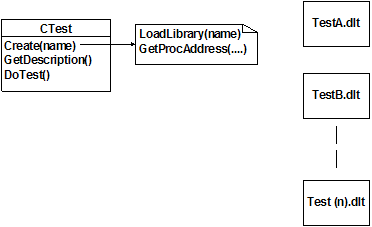 |
The logic (in pseudo-code) is:
FOR each *.DLT file in directory
Create(file)
GetDescription()
Add to list
Close(file)
END FOR
User selects test from the list
Create(selected test)
DoTest() |
Data Dictionaries
During design, prior to coding, it is useful to create a data dictionary of the data as viewed by the user. This is not intended to be a comprehensive dictionary of all data that will be used in the software - that would be a Herculean and pointless task! However, by identifying the data from the user's viewpoint, it becomes easier for a programmer to create the appropriate objects.
For example, in one application there was data to be stored for each sample tube. The data dictionary was:
Name |
Type |
Domain |
Semantic Use |
TUBENUMBER |
UINT |
1 – 200 |
Tube’s ordinal position in the worklist. |
TUBEID |
STRING |
30 CHARS max. |
Sample barcode for this tube. |
TUBEFLAGS |
STRING |
30 CHARS max |
Each character is a status flag. A flag consists of a single ASCII character. Order of flags is irrelevant. |
TUBEUSED |
BOOL |
TRUE or FALSE |
TRUE if this tube is used, FALSE if it is a <blank> tube. For example, a Rack could exist with ten tubes, of which only a few are used. |
One interesting piece of information that arose was the TUBENUMBER. From the user's perspective, the TUBENUMBER was needed to load the tubes into the racks - they had to be loaded in that order. However, TUBENUMBER is not actually an attribute of a Tube - it's the tube's ordinal position in a Rack. A Tube by itself has no concept of a TUBENUMBER. Therefore, during design the task of obtaining the TUBENUMBER was given to the Rack - it had to be able to return the ordinal position of any TUBEID that it contained.
When To Retire The Code?
When has the code simply had enough? No matter how many do-dads and replacement parts you add to an Edsel, it's still an Edsel. Eventually, the code just can't take it any more. Refactoring can help put life back into old code, but how do you tell the boss that you want three more months for something called "refactoring?"
Software metrics are the answer. There's an axiom from Fred Brooks in his book The Mythical Man Month: correcting a software defect has a 50% chance of introducing another defect.
By keeping metrics on defect rates, such as defects per lines of code changed, you can watch the defect rate climb over time. One project I had underwent significant change over a four year period. After two years, the defect rate per line of code changed had tripled. Armed with those metrics, I was able to convince the boss to give me four months for refactoring - although he had no idea what "refactoring" was. This kept the software going for another two years, after which another major section was refactored.
If refactoring fails to reduce the defect rate, then it's time to rewrite or retire the code. |